

 図書館カレンダー
FAQ
FAQ(English)
How do I register a tag?
カテゴリ:
5.1. Personal Services
 .
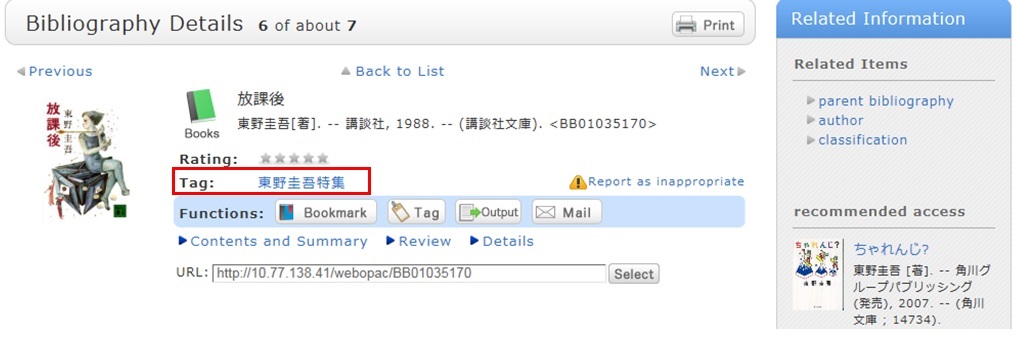
.Method 2) In the bibliography details screen, click
.However, tags such as those used in a list of the specified books in a syllabus (e.g., all university, 2012 first term) cannot be registered.
Referring to other tags
By attaching the same tags to multiple bibliographies, you can batch search them.
Checking the tag history
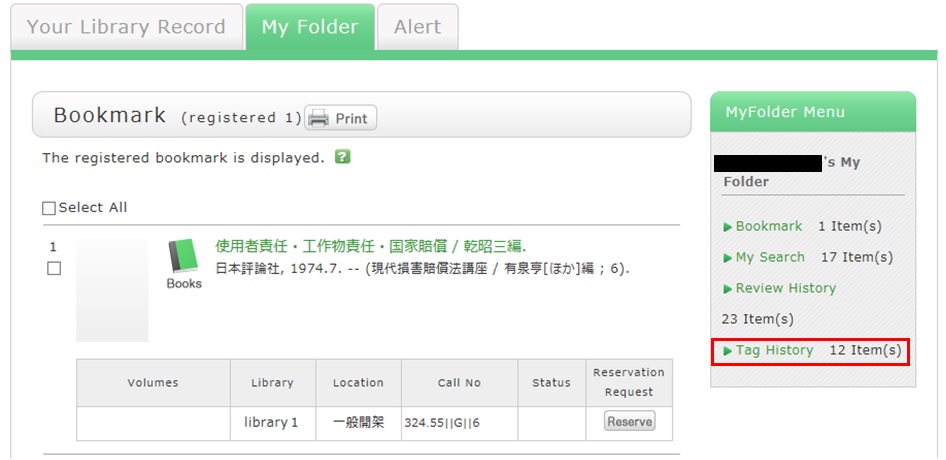
You can check the tag history from [OPAC] -> [My Folder] -> [Tag History], which is on the right menu.
What if a tag is inappropriate?
If you think that a tag is inappropriate or does not match the material, please contact us.
Click [Report as inappropriate] behind "Register tag" on the bibliography details screen to register your report.
How do I check the tags that I attached?
カテゴリ:
5.1. Personal Services
I have books used in lectures and laboratories. I want to share them with friends. Is there a good way to do this?
カテゴリ:
5.1. Personal Services
For example, suppose you add a tag such as the following: "This was helpful in _____ lecture." or "A must read for _____ laboratory." Then, anyone can bring up the same list of materials when searching tags.
You can register tags from both the list screen and details screen.
★I have a book I want to sell.
★I want to express a question, opinion, or request to the library.
図書館案内
利用者サービス
図書館活用ガイド



図書館アプリ

App Store:Fujitsu Limited
Google Play:FUJITSU LIMITED