

 図書館カレンダー
FAQ
I want to be notified of any books related to _____ received by the library. Is this possible?
カテゴリ:
5.1. Personal Services
The function of this service is to memorize search conditions and send notification by e-mail, RSS, etc.
when the library receives any matching material.
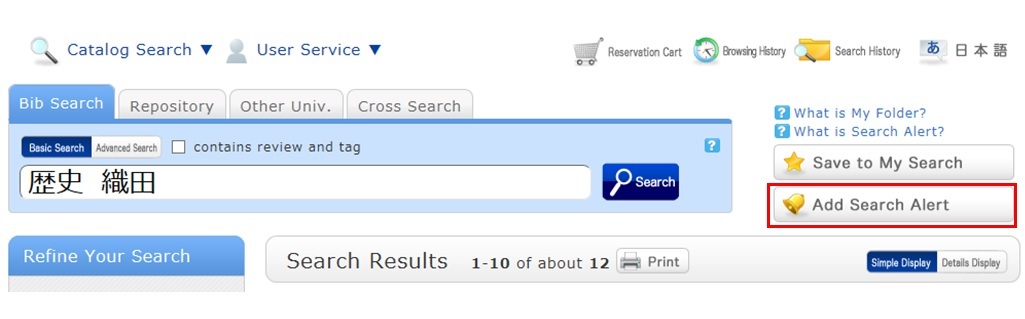
After a search with OPAC Bib Search, you can register the search conditions by clicking "Add Search Alert."
You can also register search conditions from Alert in OPAC.
The process of registration displays the Alert list screen.
From there, you can check the list being sent and change the sending frequency.
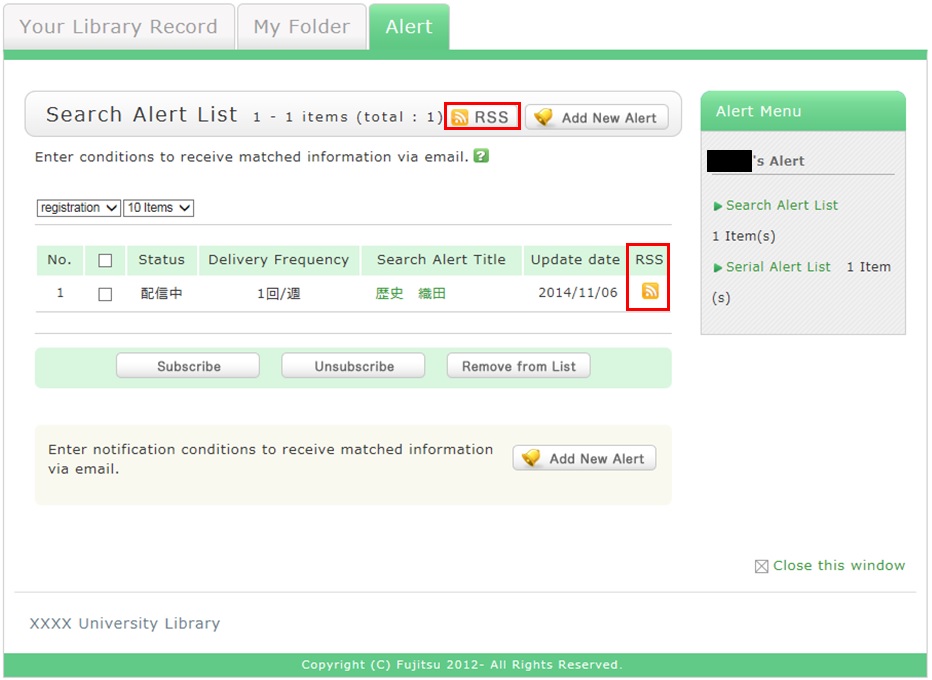
You can register an RSS reader from the [RSS] button.
Once you have registered the RSS reader, you can check for any new arrivals of the relevant materials,
even without checking OPAC.
図書館案内
利用者サービス
図書館活用ガイド



図書館アプリ

App Store:Fujitsu Limited
Google Play:FUJITSU LIMITED