

 図書館カレンダー
FAQ
FAQ(English)
How do I cancel a submitted borrowing request (ILL borrowing request)?
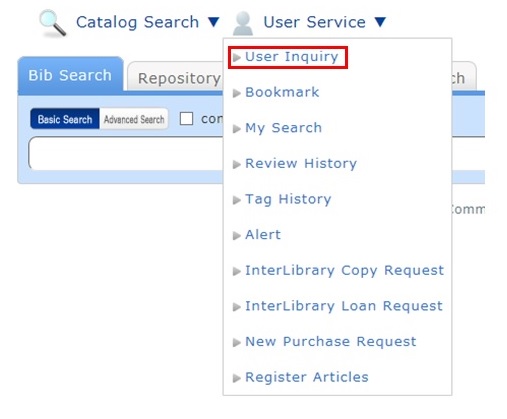
You can confirm your loaned out materials and various requested materials on the user inquiry screen.
Select "Go to ILL Request List" in the information relating to borrowing requests, among those requests.
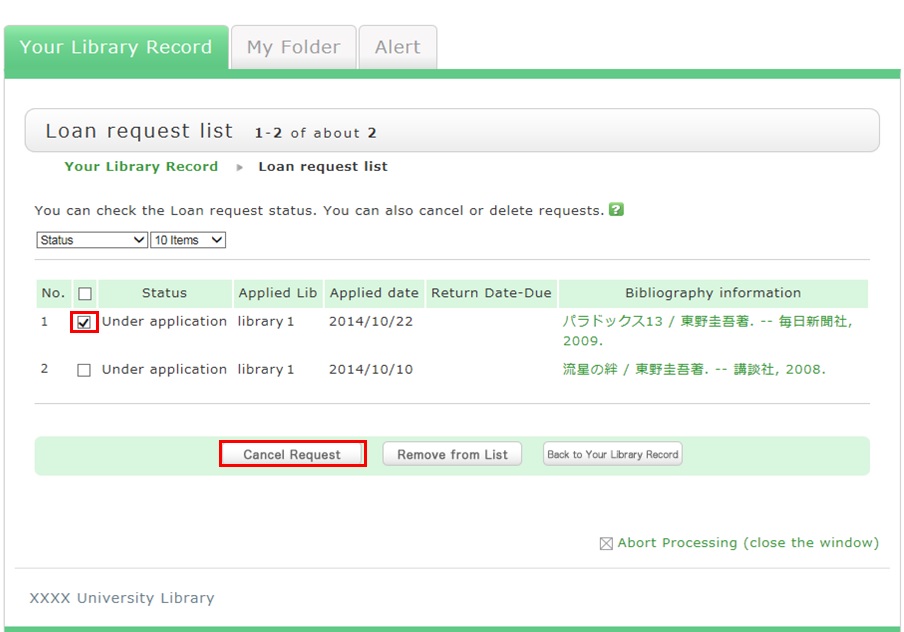
As a result, you can check a list of the borrowing requests that are current requests.
If you want cancel the request for a material in this list, place a check mark beside the material and click the [Cancel Request] button.
図書館案内
利用者サービス
図書館活用ガイド



図書館アプリ

App Store:Fujitsu Limited
Google Play:FUJITSU LIMITED